
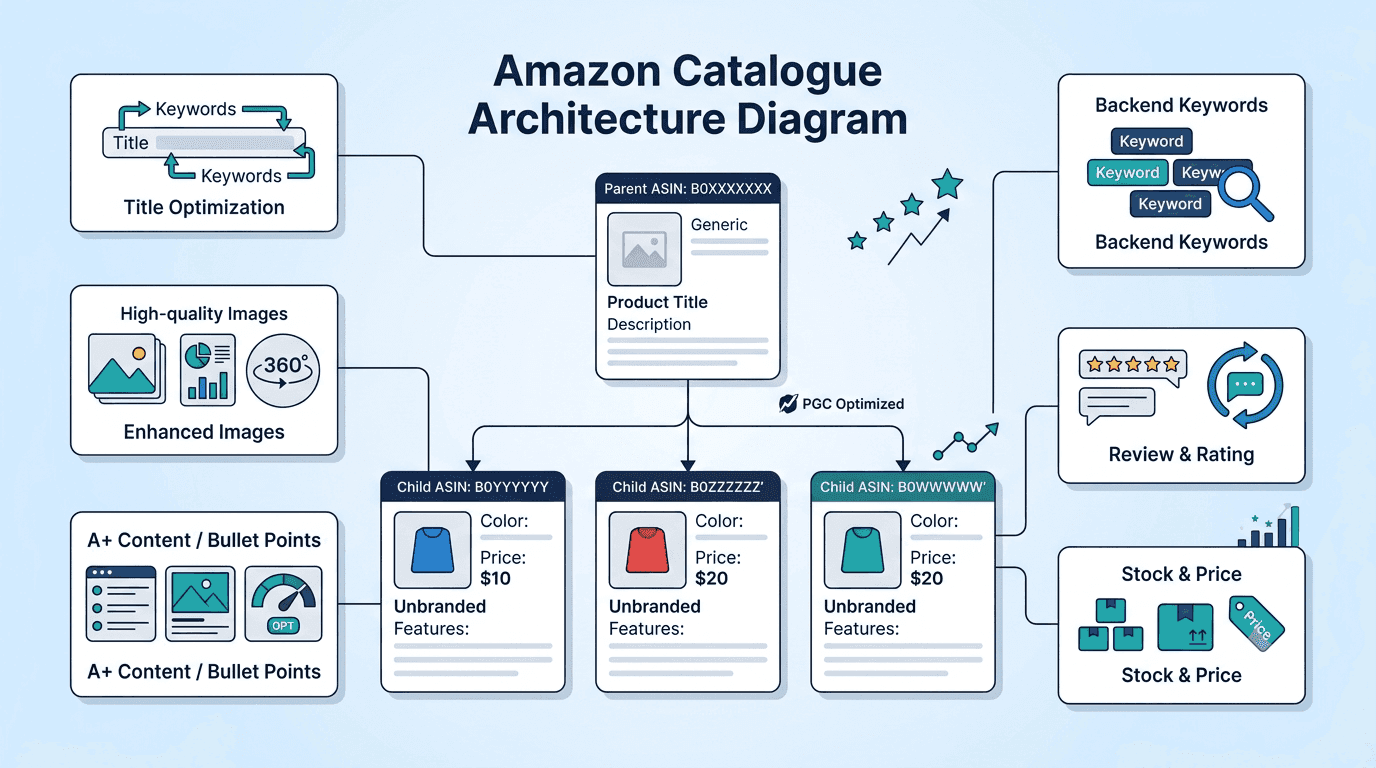
Amazon UK Catalogue Structure: A Step-by-Step Guide to Higher Conversion
Poor catalogue structure on Amazon drains conversion rate and wastes ad spend without announcing itself. This step-by-step guide covers every element UK brands need to structure Amazon listings that rank, convert, and compound over time.
Poor catalogue structure is invisible damage. It does not announce itself with an error message or a warning in Seller Central. It just quietly drains your conversion rate, wastes your ad spend, and confuses Amazon's algorithm until the gap between your account's performance and its potential becomes impossible to ignore.
Most Amazon UK sellers focus on keywords and images. Both matter. But they sit on top of a foundation that either supports them or undermines them, and that foundation is a catalogue structure.
A correctly structured Amazon catalogue does three things simultaneously. It ranks by helping Amazon's search algorithm and its AI shopping assistant Rufus understand precisely what you are selling and to whom. It converts, by making it simple for shoppers to choose the right variant and complete a purchase. And it consolidates social proof, by combining reviews and sales velocity across variations so your products build rank faster.
This guide covers every step of building that structure correctly, from category selection through to A+ Content and Rufus AI optimisation.
What Is Amazon Catalogue Structure and Why Does It Matter?
Amazon catalogue structure is the architectural framework of your product listings, how your ASINs are organised, how variations are grouped, which categories they live in, and how all the listing elements work together to signal relevance to Amazon's algorithm and purchase confidence to shoppers.
A well-structured catalogue is not just a presentation layer. It is an operational system. Every element of your catalogue directly affects:
Search visibility: Amazon's algorithm uses your category placement, title keywords, backend search terms, and listing completeness to determine when and where your products appear
Conversion rate: Clear variation structure, benefit-led bullet points, and complete image stacks reduce purchase hesitation and return rates
Advertising efficiency: A poorly converting listing inflates ACoS regardless of how well your campaigns are built, the listing is where traffic converts or does not convert
Account health: Broken parent-child relationships, duplicate ASINs, and incorrect category placement generate suppressions and policy flags that affect your entire account
Step 1: Choose the Right Category and Product Node
This is the step most sellers skip, and the one that costs the most when done incorrectly.
Amazon's browse tree has thousands of product nodes. Each node sits within a category hierarchy and determines which shoppers can find your product through browse navigation, which category-specific features are available (such as size charts, material fields, or safety data), and which Amazon programme eligibility applies (including certain FBA fee structures).
Choosing the wrong node:
Makes your product invisible to shoppers browsing by category
Misses category-specific search terms that Amazon indexes from node-specific fields
Can trigger listing suppressions if Amazon's classification system flags a category mismatch
Removes access to category-specific A+ Content modules and Brand Story features
How to find the correct node for Amazon UK:
Search your primary keyword on amazon.co.uk and look at where the top three organic results are categorised (visible in the product detail section under "Additional Information")
Cross-reference with the category style guide for your product type in Seller Central, Amazon UK publishes style guides for every major category that specify exactly which fields are required and which node to select
If in doubt, use Amazon's Browse Tree Guide (BTG) available in Seller Central Help to trace the exact node path for your product type
For UK brands, some categories have post-Brexit regulatory fields that are mandatory, UKCA marking information for applicable product types, WEEE registration numbers for electronics, and FSSAI or similar compliance fields for food and health products imported into the UK. These fields only appear when you select the correct category node. Missing them causes suppressions.
Step 2: Get Your Parent-Child Variations Right
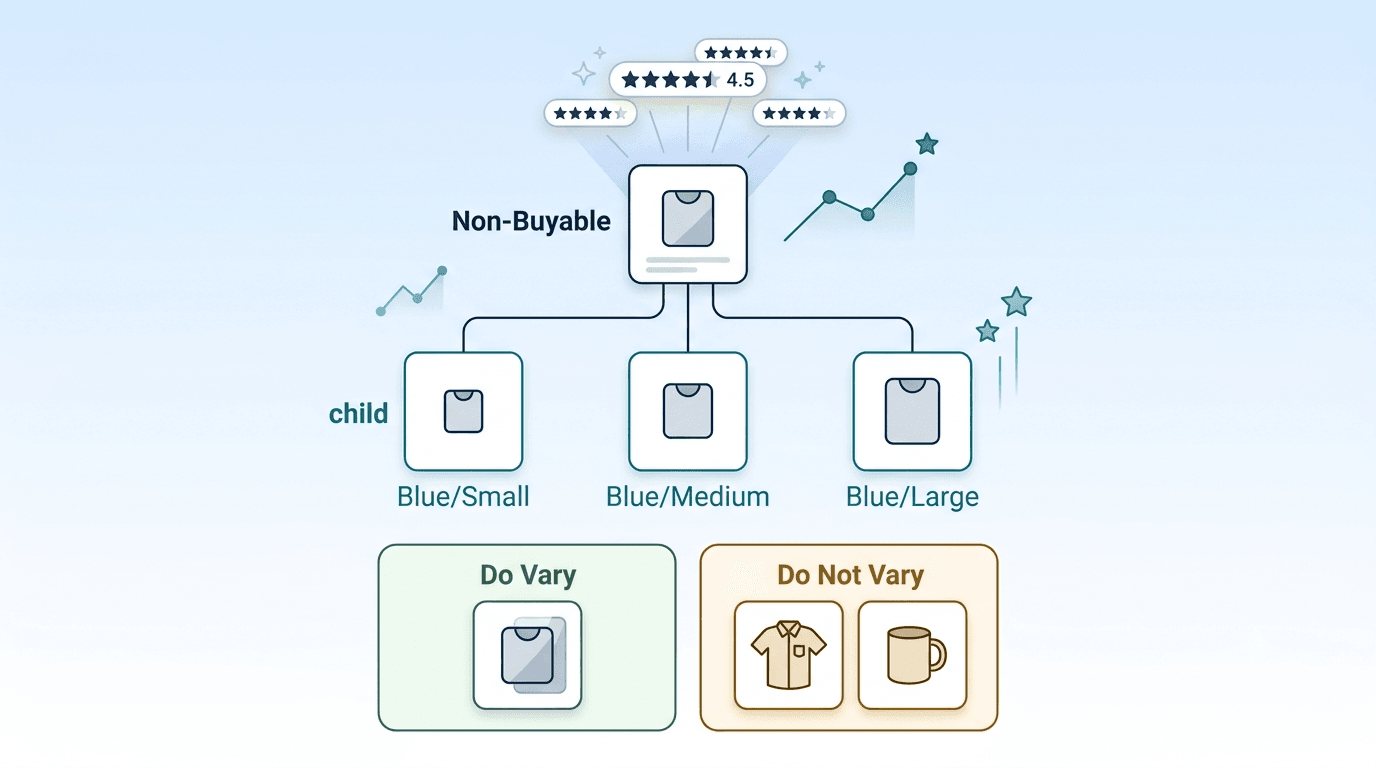
A variation family groups related products on a single product page through a parent-child relationship.
The Parent ASIN is an invisible umbrella listing. It cannot be purchased, has no price or stock, and exists only to hold the variation family together. Reviews and sales rank accumulate at the parent level and benefit all child ASINs in the family.
The Child ASINs are the actual purchasable products, each representing a specific combination of attributes such as colour and size, flavour and quantity, or material and pack size.
The golden rule of variations: Only group products together if they are fundamentally the same item differing by a single valid variation theme. Amazon UK accepts colour, size, flavour, scent, material, and pack quantity as valid variation themes. Most categories accept only one or two themes per variation family.
Do vary: A water bottle in 500ml, 750ml, and 1L, same product, different sizes.
Do not vary: A water bottle and a lunch box from the same brand, different products, not a valid variation.
2026 policy update on review sharing: Amazon now separates reviews for variations with significant functional differences. If child ASINs differ in capacity, power output, active ingredients, or other performance-relevant specifications, Amazon splits their ratings into individual pools rather than sharing them at parent level. Keep variation families to cosmetic differences, colour, size, pattern, to maintain shared social proof across the family.
Common variation mistakes to fix:
Grouping products that should be separate listings (different product types, not just different variants)
Creating orphan child ASINs, child ASINs whose parent ASIN has been deleted or suppressed
Mixing variation themes within one family (colour and pack size in the same family where only one theme is permitted)
Listing the same ASIN as both a standalone and as a child within a variation family
Step 3: Build Titles That Rank and Convert
Your title is the first element Amazon's algorithm reads, and the first thing a shopper sees in search results. It needs to do both jobs simultaneously: signal relevance to the algorithm and communicate value to the shopper, without sacrificing either for the other.
The standard title formula for Amazon UK:
[Brand Name] + [Primary Keyword] + [Key Specification or Material] + [Variant Details]
Titles that don't convert: GlowSkin Vitamin C Serum Face Serum Anti-Ageing Brightening Skin Serum Best Face Care 30ml
Titles that convert: GlowSkin 20% Vitamin C Serum with Hyaluronic Acid, Brightening Facial Serum for Sensitive Skin, 30ml
The good title reads naturally, front-loads the primary keyword, includes a key specification (20% concentration), addresses a shopper concern (sensitive skin), and includes the variant detail (30ml). The bad title is keyword-stuffed, repetitive, and reads like it was written for a robot.
UK-specific title rules:
Keep titles under 150 to 200 characters- check your specific category style guide in Seller Central for the exact limit
Put the most important information in the first 60 characters- mobile screens truncate titles after this point, and mobile is the primary shopping device for Amazon UK
Use British English spelling throughout- "colour" not "color," "aluminium" not "aluminum," "litre" not "liter"
Do not include promotional language such as "Best," "Sale," "Free Shipping," or price information- these violate Amazon UK title policies and trigger suppressions
Step 4: Structure Your Image Stack for Instant Clarity
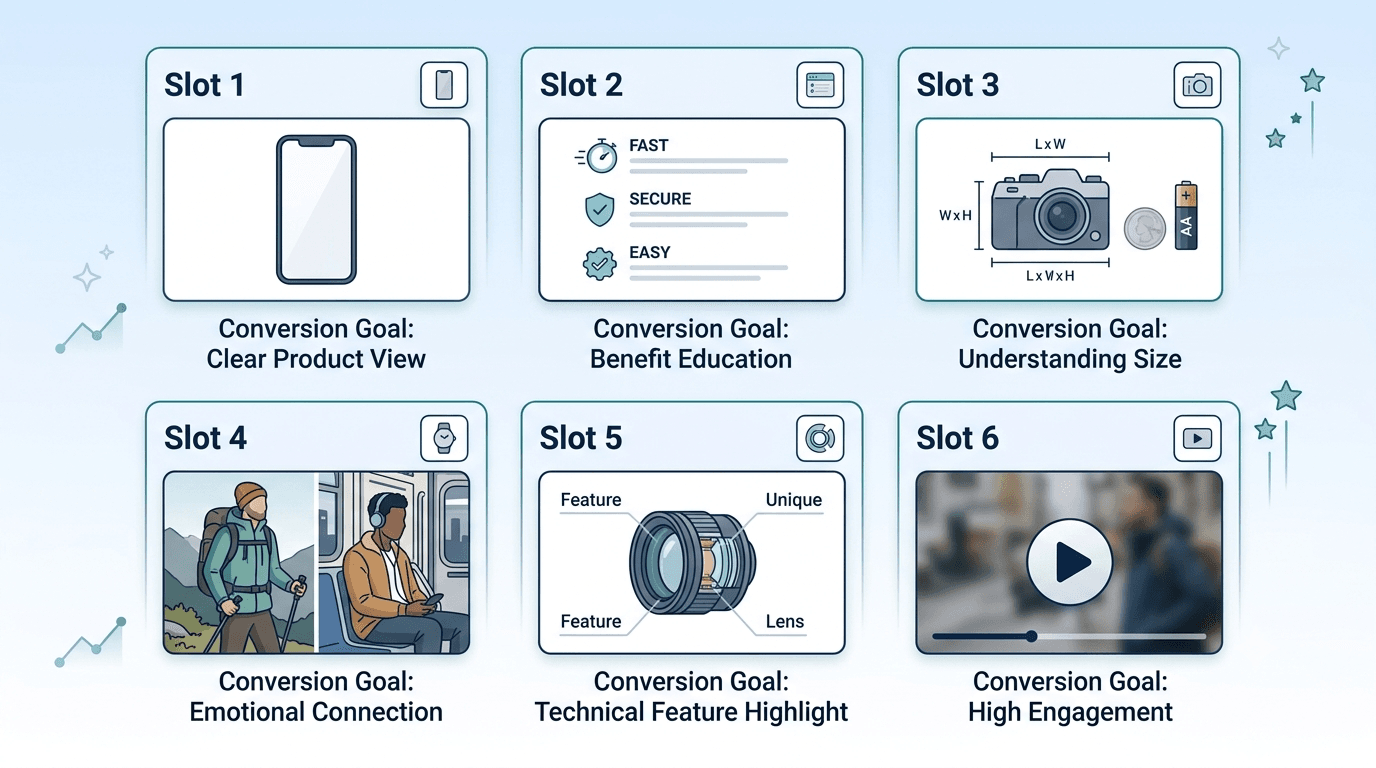
Shoppers swipe through images before reading a word of text. Your image stack must tell the complete product story, what it is, why it is better, how it is used, and what size it is, without requiring the shopper to read anything.
Image Slot | Content | Conversion Goal |
Main image | Pure white background (RGB 255,255,255), product fills 85% or more of frame, no text or badges | High click-through rate from search results |
Image 2 | Key benefit callout: "100% Organic Cotton," "Waterproof to 50m," "BPA Free" | Answers: what makes this better? |
Image 3 | Dimension or scale reference, product next to a familiar object or on a mannequin | Prevents size-related returns |
Image 4 | Lifestyle or in-use shot, product being used in a clean, relatable setting | Helps the shopper picture owning it |
Image 5 | Feature infographic, close-up of materials, craftsmanship, or ingredient detail | Addresses top purchase objections |
Image 6 | Video, 15 to 30 second product demo showing texture, assembly, or key feature | Improves conversion rate, particularly in beauty, home, and electronics |
UK-specific image considerations: Avoid imagery that contains US-specific elements, American power sockets, US sizing labels, or USDA certification badges. UK shoppers notice these, and they reduce purchase confidence. If your product has any UK-specific certifications (CE marking, British Standards, Made in Britain mark), display them in image 5 or as a badge overlay on lifestyle images.
Step 5: Write Bullet Points That Convert Browsers to Buyers
Amazon gives you five bullet points. Most sellers use them to list features. The highest-converting listings use them to solve customer problems.
The structure that works:
Capitalise the first two to four words of each bullet to act as a scannable mini-header for mobile shoppers. Then complete the bullet with a benefit statement, not a feature statement.
Feature: Double-wall vacuum insulation. Benefit: Keeps drinks ice-cold for 24 hours, no sweating, no leaks in your bag.
What to put in your five bullets:
Primary benefit, the core reason someone buys this product
Second most important feature translated into a benefit
Answer to the most common purchase objection from competitor reviews
Compatibility, fit, or usage guidance (reduces returns significantly)
Brand promise or unique differentiator: sustainability, warranty, UK-based support
What to avoid: Repeating the same point in different words, listing specifications without benefits, and using promotional language such as "Best in class" or "Number one," which violates Amazon UK content policies.
Step 6: Optimise Backend Search Terms
Backend search terms are hidden keywords in Seller Central that tell Amazon what your product is without cluttering your public listing. Amazon indexes these alongside your visible listing content to determine search relevance.
The rules for Amazon UK backend search terms:
Byte limit: Amazon gives you 249 units of space for backend keywords — but it measures space in bytes, not letters. For most standard English words, one letter equals one byte, so you will not notice the difference. Where it matters is accented characters- letters like é, ü, or ñ that appear in product names or ingredient terms take up two bytes each instead of one. If you go over 249 bytes by even one, Amazon ignores the entire field, not just the extra words. The safest approach is to write your keywords, check the byte count using a free online byte counter tool, and trim if needed.
Just write your keywords separated by spaces, no commas needed. Write
running shoes men lightweight waterproofnotrunning shoes, men, lightweight, waterproof. Amazon reads it either way, but spaces keep your byte count lower.What to leave out
Do not include your brand name, any competitor brand names, your ASIN, or any words already in your title or bullet points. Amazon indexes those automatically; repeating them wastes your 249 bytes without adding anything.What to include
Think about how your customer might search for your product using different words than you used in your title. Synonyms, British English spellings, common misspellings, and related use cases are all fair game. If your title says "water bottle," your backend terms could include "drinks flask," "reusable bottle," "hydration bottle," and "gym bottle."
A practical approach: Write your backend keywords as a natural sentence describing your product from a different angle than your title. "Compact lightweight travel water bottle reusable eco friendly BPA free gym outdoor cycling commute" uses 90 bytes, covers multiple use cases, and reads as natural search behaviour.
Step 7: Complete A+ Content and Brand Store
A+ Content and Brand Store are not optional extras. They are catalogue structure elements that directly affect conversion rate and brand discoverability.
A+ Content replaces your standard product description with a rich visual module with lifestyle imagery, benefit comparison charts, brand story sections, and ingredient or material close-ups. Listings with A+ Content consistently convert at higher rates than plain listings in the same category. According to Amazon's own benchmarks, A+ Content improves conversion rates by an average of 8%.
For multi-variant listings, A+ Content appears at the parent ASIN level and benefits all child ASINs in the family. Building it once multiplies its conversion impact across your entire variation family.
Brand Store is your dedicated storefront within Amazon- a curated, multi-page experience showing your full product range, organised by category or use case, without competitor ads. Brand Store links from Sponsored Brands ads during sale events (Great Indian Festival, Prime Day, Q4 peak) significantly outperform links to individual product listings because they capture brand-aware shoppers who want to browse rather than search.
Build your Brand Store with the same attention to structure as your catalogue. Organise it by customer need or product category, not by your internal SKU naming convention.
Step 8: Optimise for Rufus AI and Amazon's Search Algorithm
Rufus is Amazon's AI shopping assistant, integrated into search on Amazon.co.uk and Amazon's mobile app. When a shopper types a conversational query like "what is a good water bottle for hiking in the UK?" or "which face serum is best for sensitive skin?", Rufus reads your listing content and decides whether to recommend your product.
What Rufus reads to make recommendations:
Your product title and bullet points, particularly benefit statements and use case descriptions
Your A+ Content, brand story, and product comparison sections
Customer reviews, what buyers say about your product in their own words
Your Q&A section, questions and answers on your product page
How to optimise for Rufus:
Write your listing content in natural language that answers questions, not just in keyword strings designed for traditional search. A bullet point that reads "Suitable for sensitive skin types, dermatologist tested and fragrance-free" answers the question "is this safe for sensitive skin" directly, which is exactly how Rufus evaluates product fit.
Include use case language throughout your listing: who this product is for, what problem it solves, when to use it, and what makes it different. This natural language layer is what Rufus and Amazon's broader semantic search capabilities extract when matching products to conversational queries.
For UK brands, include British English use cases and regional references where relevant, "ideal for UK weather," "suitable for UK electrical standards," "meets UK safety regulations." These signals improve relevance for UK-specific queries on Amazon.co.uk.
How Catalogue Health Affects Your Amazon Advertising Performance
A listing with a weak conversion rate inflates ACoS regardless of how well your Sponsored Products campaigns are built. If 100 people click your ad and only two buy, your ACoS is five times higher than if five people buy from the same 100 clicks. No amount of bid optimisation compensates for a structural conversion problem at the listing level.
Specific catalogue issues that directly inflate advertising costs:
Broken parent-child relationships mean review count and sales velocity are split across separate ASINs rather than consolidated at parent level. Lower review counts reduce conversion rates and increase the ad spend required to generate the same sales volume.
Wrong category placement means your ads may be serving shoppers who are looking for something adjacent to what you sell. High click-through rate with low conversion rate is often a category or relevance mismatch, not a bid problem.
Weak listing content converts paid traffic poorly. Every pound spent on Sponsored Products driving traffic to a listing with thin bullet points, poor images, or a sub-4.0 star rating is a pound working against itself.
Listing suppressions from catalogue errors stop ads from serving entirely. An ASIN that has been suppressed due to a missing required field, a policy violation, or an incorrect category placement will not appear in any ad auction, meaning your campaign budget is allocated to fewer active ASINs, distorting performance data and reducing coverage.
Pinnaclegrowth.ai monitors catalogue health continuously, surfacing suppression alerts, listing quality scores, and variation relationship issues before they compound into advertising performance problems. A dedicated account manager reviews these signals weekly and acts on them before they affect your campaigns.
For more on how catalogue structure and listing quality interact with Amazon PPC performance, read our full guide on Amazon Sponsored Ads.
The Complete Catalogue Optimisation Checklist
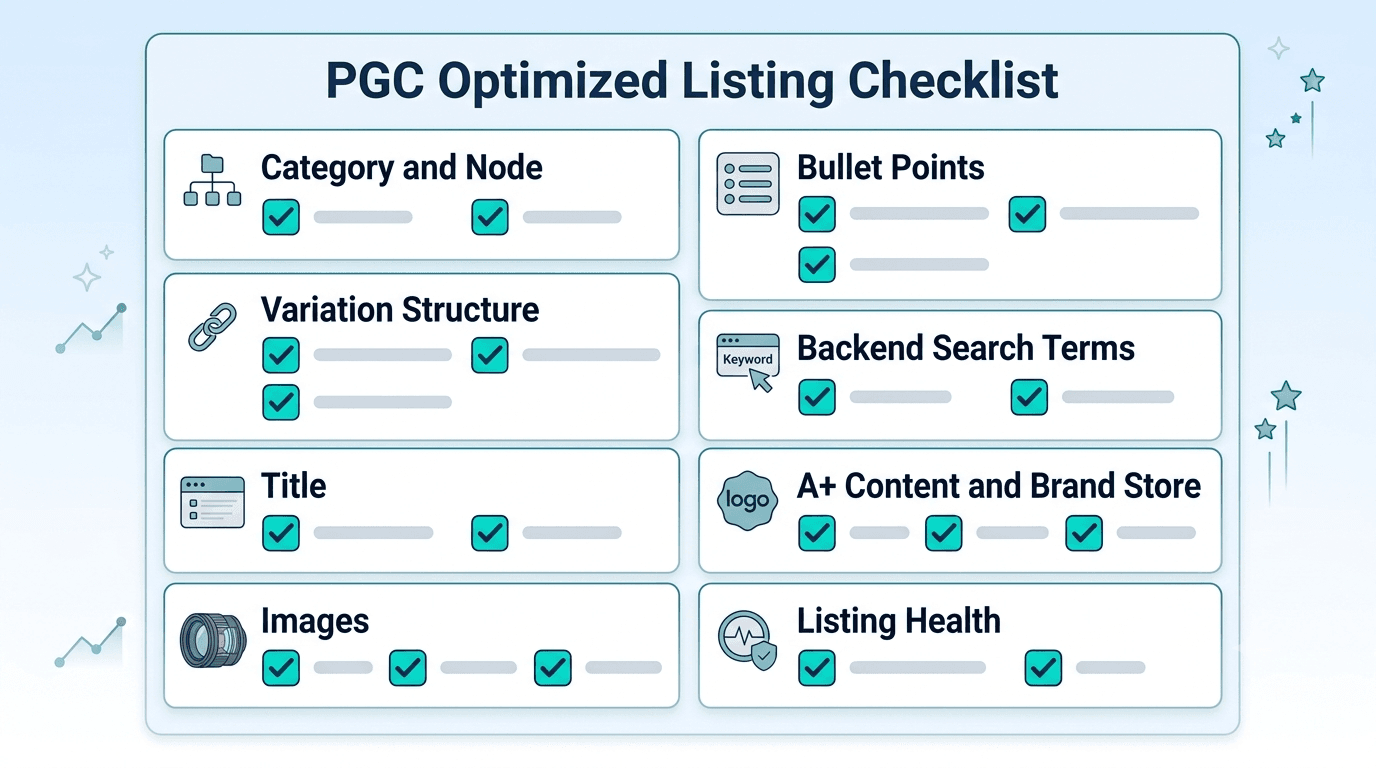
Run every ASIN through this checklist before launching or scaling paid ads:
Category and Node
Product is listed in the correct UK category node verified against amazon.co.uk search results
All mandatory category-specific fields are complete (compliance fields, size charts, material fields)
UK regulatory fields (UKCA marking, WEEE, FSSAI where applicable) are populated
Variation Structure
Parent-child relationship uses a single valid variation theme
No orphan child ASINs (parent exists and is not suppressed)
Only fundamentally similar products are grouped in the same variation family
No duplicate ASINs for the same product variant
Title
Primary keyword in first 60 characters
British English spelling throughout
Under 150 to 200 characters (check category style guide)
No promotional language or price references
Images
Main image: white background, 85% or more frame fill, no text badges
Minimum five images covering benefits, dimensions, lifestyle, and features
No US-specific visual elements (power sockets, US sizing, USDA badges)
Bullet Points
Five bullets present with capitalised opening words
Each bullet leads with a benefit, not a feature
At least one bullet addresses the most common purchase objection
Backend Search Terms
Under 249 bytes (not characters)
No brand names, ASINs, or duplicate keywords from title
Includes British English variants and common misspellings
A+ Content and Brand Store
A+ Content complete and approved for all key ASINs
Brand Store live with logical category organisation
Brand Store linked in Sponsored Brands campaigns
Listing Health
Minimum 4.0 star rating before scaling paid ads
Minimum 15 reviews per SKU
No active listing suppressions or policy violations
Account Health Rating in Good standing
Build a Catalogue That Works as Hard as Your Ads
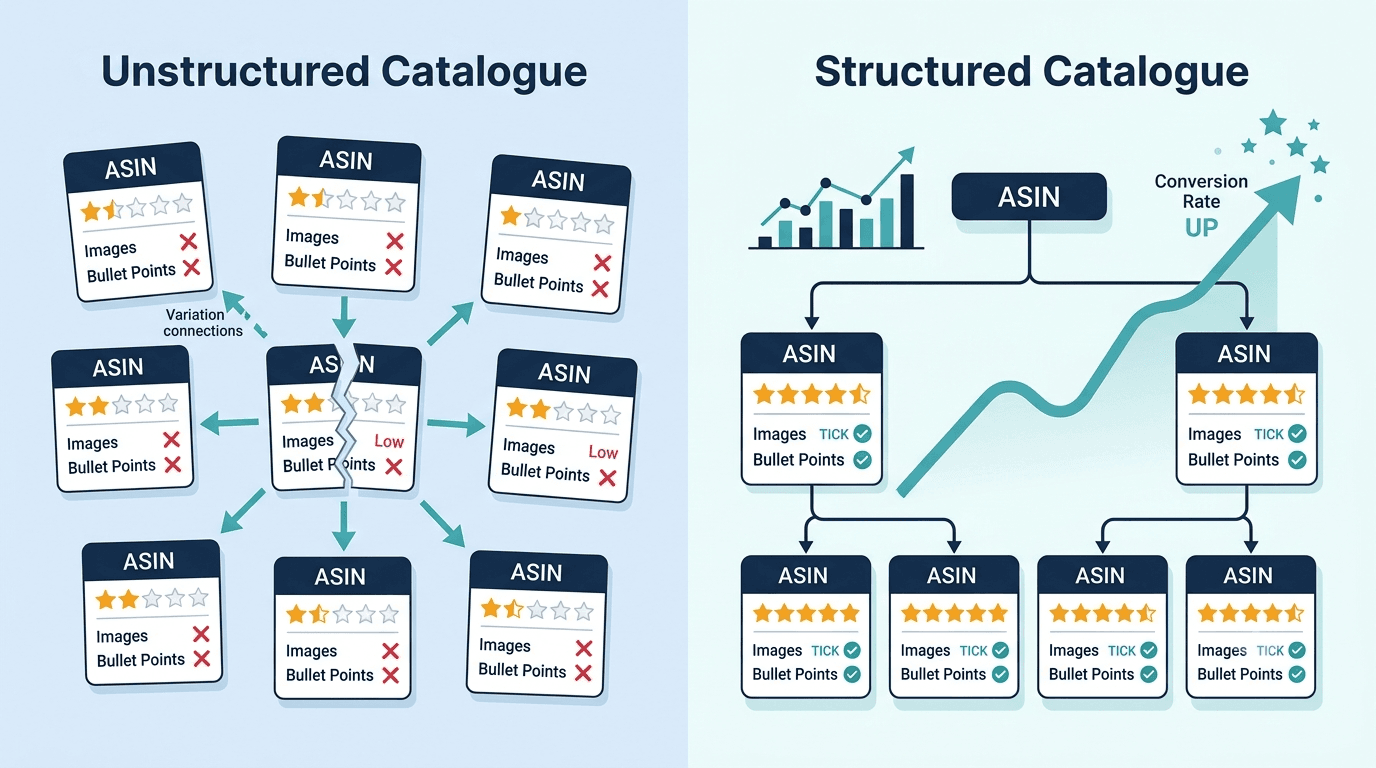
A well-structured Amazon catalogue does not just sit there looking good. It actively works alongside your advertising, converting the traffic your campaigns send, building organic rank from the velocity they generate, and protecting the social proof that makes both paid and organic performance compound over time.
Pinnacle Growth Consulting manages Amazon catalogue structure as a core component of account management for UK brands through Pinnaclegrowth.ai, monitoring listing health, suppression alerts, and variation relationship issues continuously alongside campaign performance.
For UK brands that want their catalogue built correctly from the ground up, or audited and restructured if it is already live:
Explore our Amazon Marketplace Management services for UK brands →
Frequently Asked Questions
Amazon catalogue structure is the organisational framework of your product listings, how ASINs are categorised, how variation families are built, and how listing elements (title, images, bullet points, backend keywords, A+ Content) work together to signal relevance to Amazon's algorithm and drive purchase decisions. A well-structured catalogue improves search visibility, conversion rate, and advertising efficiency simultaneously.
A parent-child relationship groups related product variants on a single Amazon product page. The parent ASIN is a non-purchasable umbrella listing that holds the family together and accumulates shared reviews and sales rank. Child ASINs are the actual purchasable products, each representing a specific variant such as a colour, size, or flavour. Shoppers land on the parent page and select their preferred variant to purchase.
Amazon UK does not publish a hard maximum number of variations per parent ASIN, but practical limits apply. Most categories support up to two variation themes (for example, colour and size together). Some categories restrict variation to a single theme. Too many child ASINs in one family can slow page load and make variant selection confusing for shoppers; focus on grouping only the variants that customers genuinely compare side by side.
Backend search terms are hidden keywords entered in Seller Central that Amazon indexes to determine your product's search relevance without displaying them on your public listing. The field has a 249-byte limit, not a character limit. Separate words with spaces rather than commas, exclude words already in your title or bullet points, and include British English variants, synonyms, and common misspellings. Exceeding 249 bytes causes Amazon to ignore the entire field.
Low conversion rate with good ad traffic typically indicates a catalogue or listing quality issue rather than an advertising problem. Common causes include: weak or unclear main image, bullet points that list features rather than benefits, a sub-4.0 star rating or fewer than 15 reviews, incorrect category placement causing a relevance mismatch, missing A+ Content in a competitive category, or variation structure issues that confuse shoppers choosing between variants. Fix the listing before increasing ad spend.
Catalogue structure directly affects ACoS because ACoS is ad spend divided by ad-attributed revenue. A listing with a low conversion rate generates less revenue per click, which means more ad spend is required to produce the same sales volume, pushing ACoS up. Broken variation families split social proof across ASINs and reduce conversion rates. Wrong category placement sends ad impressions to mismatched audiences. Fixing catalogue structure is one of the highest-return interventions available for reducing ACoS before touching bid strategy.