
How to Reduce Amazon PPC ACoS Without Losing Sales or Revenue
Learn how to reduce Amazon PPC ACoS without hurting sales or revenue. Discover proven strategies to optimize bids, keywords, targeting, budgets, and campaigns while improving ROAS, profitability, and long-term marketplace growth with practical tips.
Your ad spend is climbing, your sales look healthy, and your profit still feels thin. If that sounds familiar, ACoS is usually where the problem hides. Most sellers know how to reduce ACoS on Amazon PPC in theory, cut bids and pause weak keywords, but that approach often removes profitable sales along with the waste.
Advertising Cost of Sale is simply your ad spend divided by the revenue those ads produced. A high number is not automatically bad, and a low number is not automatically good. What matters is whether your ACoS sits below the point where you stop making money on each order.
This guide breaks down the practical levers that actually move the metric: bid maths, search term hygiene, campaign structure, placement control and conversion rate. You will get a step-by-step process you can run this week, a comparison of the main approaches, the mistakes that quietly drain budget, and answers to the questions sellers ask most. The goal is sustainable Amazon ad spend optimization not a smaller advertising bill.
Key Takeaways
ACoS is a ratio, not a verdict. Compare it against your break-even ACoS (your profit margin) before deciding whether a campaign is failing.
Conversion rate moves ACoS faster than bids. Doubling conversion rate halves ACoS at the same cost per click, without touching a single bid.
Most waste sits in search terms, not keywords. Broad and auto campaigns collect irrelevant traffic that only shows up in the search term report.
Use the bid formula: Max CPC = Price x Conversion Rate x Target ACoS. It replaces guesswork with a number tied to your actual margin.
Judge performance on TACoS over time. Total Advertising Cost of Sale shows whether ads are building organic rank or just renting sales.
What Is ACoS and What Counts as Good?
ACoS is calculated as ad spend divided by ad-attributed sales, expressed as a percentage. Spend 200 on ads, generate 1,000 in ad sales, and your ACoS is 20%.
There is no universal benchmark. A 15% ACoS can be terrible for a high-margin private label product, and a 45% ACoS can be excellent for a launch campaign building review velocity. The only benchmark that matters is your own break-even point.
How to Calculate Your Break-Even ACoS
Break-even ACoS equals your profit margin before advertising. Work it out like this:
Start with your selling price.
Subtract product cost, Amazon referral fee, FBA or fulfilment fee, storage, returns allowance and shipping.
Divide what remains by the selling price.
If a product sells for 1,000 and every non-ad cost totals 700, your margin is 300, so your break-even ACoS is 30%. Anything above 30% loses money on that sale. Your target ACoS should sit meaningfully below it, often 15% to 22% for a mature catalogue.
ACoS vs TACoS vs ROAS
Metric | What it measures | Best used for |
ACoS | Ad spend as a share of ad-attributed sales | Judging individual campaigns and keywords |
TACoS | Ad spend as a share of total revenue, ads plus organic | Judging whether ads are building organic momentum |
ROAS | Revenue returned per unit of ad spend | Reporting to stakeholders who think in return, not cost |
A falling TACoS alongside steady ACoS is a strong signal. It means organic sales are growing while advertising holds its position.
Why Your ACoS Is High: The Five Real Causes
High ACoS almost always traces back to one of five issues. Diagnose before you act.
1. Cost per click is too high for your economics. You are winning placements you cannot afford at your current conversion rate.
2. Conversion rate is too low. The traffic arrives but the listing does not close the sale. Images, price, reviews, availability and Buy Box ownership all sit here.
3. Irrelevant search terms are absorbing clicks. Auto and broad campaigns match to queries with no purchase intent for your product.
4. Campaign structure is mixing signals. Discovery keywords and proven keywords share a budget, so your best performers get starved.
5. Placements are unbalanced. Top of Search usually converts best but costs most. Without placement adjustments, you pay premium prices for product page traffic that converts poorly.
Here is the relationship worth memorising:
ACoS = Cost Per Click / (Conversion Rate x Selling Price)
Every genuine fix works by lowering CPC, raising conversion rate, or raising average order value. Nothing else changes the number.
Comparing the Main Approaches to Amazon Ad Spend Optimization
Approach | Pros | Cons | Best For |
Lower bids across the board | Fast, immediate spend reduction | Loses impression share and rank, sales usually fall with it | Emergency budget control only |
Negative keyword pruning | Removes waste without touching good traffic | Needs regular search term review, results build over weeks | Accounts with heavy auto or broad spend |
Campaign restructuring | Fixes the root cause, protects proven keywords | Time-intensive, temporary performance dip while relearning | Accounts over roughly 100 SKUs or messy legacy structures |
Placement and dayparting control | Precise, keeps volume intact | Requires enough data to be reliable | Established campaigns with 90 days of history |
Listing conversion optimization | Largest long-term effect, also lifts organic rank | Slowest to implement, needs creative and copy work | Every seller, always worth doing |
Most sellers reach for the first row and stop there. The compounding gains sit in the last three.
Step-by-Step: How to Reduce ACoS on Amazon PPC
Step 1: Set Your Target ACoS per Product Group
Do not use one target across the catalogue. Split products into three groups: launch, growth and profit. Launch products can run near or above break-even. Growth products should sit slightly under. Profit products, usually your best sellers, should carry the tightest targets.
Step 2: Pull a 60 to 90 Day Search Term Report
Shorter windows produce noisy conclusions. Sort by spend, high to low. Focus first on search terms with meaningful spend and zero orders, because that is pure waste you can remove today.
Step 3: Add Negatives Before You Cut Bids
Apply negative exact for individual wasteful queries and negative phrase for recurring irrelevant patterns such as competitor brand names, wrong sizes, wrong materials or "free" and "cheap" modifiers. Also add negative product targeting for ASINs that consume clicks without converting. This removes waste without reducing your reach on good traffic.
Step 4: Rebid Using the Formula, Not Instinct
Set your maximum bid as:
Max CPC = Selling Price x Conversion Rate x Target ACoS
A product at 1,000 with a 10% conversion rate and a 20% target gives a maximum bid of 20. Adjust in steps of 10% to 15%, never in half. Large cuts collapse impression share and distort the data you need for the next decision.
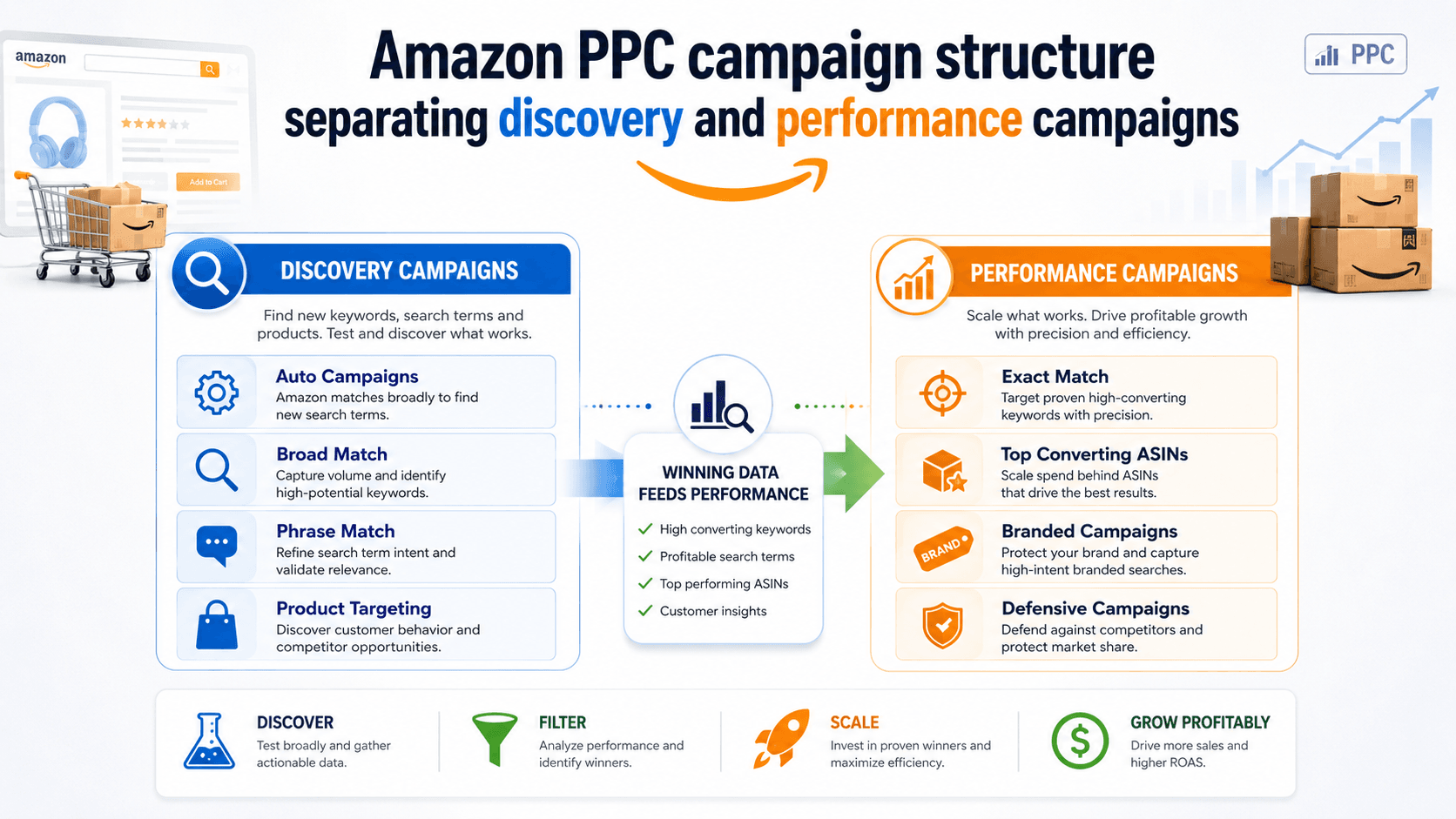
Step 5: Separate Discovery from Performance
Run auto and broad campaigns purely as research with modest budgets. When a search term proves itself, usually after several orders at acceptable ACoS, move it into an exact match campaign with its own bid and budget. Then add it as a negative in the discovery campaign so the two stop competing. This is keyword harvesting, and it is the single most reliable structural fix.
Step 6: Adjust Placements and Bidding Strategy
Check the placement report. If Top of Search converts well, apply a positive adjustment there and reduce elsewhere. If Product Pages spend heavily with weak returns, cut that placement hard. For campaigns already above target, "dynamic bids, down only" protects you from overpaying on low-intent impressions. Reserve "up and down" for proven exact match campaigns.
Step 7: Fix the Listing, Not Just the Campaign
Ads amplify whatever the listing already does. Before spending more, check the main image against the top three competitors, confirm mobile titles read clearly in the first 60 characters, verify A+ content is live, and make sure you hold the Buy Box consistently. A move from 8% to 12% conversion rate cuts ACoS by a third at identical bids.
Step 8: Review Weekly, Decide Monthly
Amazon attribution lags by roughly 48 to 72 hours, and click attribution windows extend further. Judging yesterday's data leads to bad calls. Review weekly for anomalies, but make structural decisions on 30-day trends.
Common Mistakes That Keep ACoS High
Pausing keywords too early. A keyword with four clicks and no sale has told you nothing. Wait until spend on that keyword reaches roughly twice your break-even cost per order before judging it.
Cutting bids without checking placement data. The bid may be fine while the placement modifier is doing the damage.
Optimising every campaign to the same ACoS target. Launch and profit products need different rules.
Ignoring TACoS. A campaign can show 40% ACoS while driving organic rank that carries the category. Cutting it looks smart for a month and costs you for a year.
Running one campaign for a whole catalogue. Budget flows to whichever ASIN gets impressions first, not whichever performs best.
Never refreshing negatives. Amazon's matching evolves, and a list built six months ago no longer covers current query patterns.
Reacting to daily data. Attribution delays make short-window decisions unreliable.
Expert Tips for Sustainable ACoS Reduction
Build a negative keyword library at account level. Reuse a validated base list across new campaigns so each launch starts cleaner than the last.
Watch Top of Search impression share on your top 20 keywords. Losing share here usually precedes an organic rank decline.
Defend your own product pages. Running Sponsored Display or product targeting on your own listings is often cheaper than reclaiming lost traffic later.
Use dayparting once you have 90 days of data. Many categories show clear low-conversion hours where reduced spend costs nothing in sales.
Raise average order value. Bundles and multipacks lift the denominator in the ACoS calculation without any change to advertising.
Segment by match type in reporting. Exact, phrase, broad, auto and product targeting behave differently and should never be averaged together.
Keep a change log. Record every bid and structure change with the date. Without it, you cannot attribute improvements to anything.
Conclusion
Learning how to reduce ACoS on Amazon PPC is less about cutting spend and more about removing the reasons your spend underperforms. Set a target based on real margin, clear out wasteful search terms, bid using the formula rather than instinct, separate discovery from performance, control your placements, and keep improving the listing behind the ad.
Work through those steps in order and the metric moves on its own. Skip to bid cuts and you will see a smaller ad bill next to a smaller business. Sustainable Amazon ad spend optimization protects profit and organic rank at the same time, and that combination is what compounds across quarters.
If your account has grown past the point where spreadsheets and weekly manual checks can keep up, structured account management is usually the next step.
Reviewing your own numbers and unsure whether your ACoS reflects a bidding issue or a conversion issue? Explore our Amazon advertising and marketplace growth services, or contact the Pinnacle Growth Consulting team for a look at your current campaign structure and spend allocation.
Frequently Asked Questions
A good ACoS is any figure below your break-even ACoS, which equals your profit margin before advertising. For most sellers this lands between 15% and 30%. Products in launch phase often run higher on purpose to build reviews and organic rank, while established best sellers should target the lower end.
Proven Strategies to Reduce ACOS on Amazon Optimize Your Product Listing. ... Focus on High-Converting Keywords. ... Use Negative Keywords to Filter Irrelevant Traffic. ... Adjust Bids Based on Performance. ... Segment Your Campaigns Properly. ... Run Product Targeting Ads. ... Target Long-Tail Keywords.
4x ROAS ROAS (Return on Ad Spend) The inverse of ACoS. Shows how much revenue you generate per dollar spent. A 25% ACoS equals a 4x ROAS.
Average ACoS for Amazon sellers is around 30%, though it varies by product category and campaign goals. Break-even ACoS matches your profit margin (e.g., 40% margin = 40% break-even ACoS). Key factors impacting ACoS include product listing quality, CPC, CTR, and ad targeting relevance.
Amazon advertising cost of sales (ACOS) is a metric used to measure Amazon pay-per-click (PPC) advertising campaigns.
A lower ACOS means your ads are more cost-effective, while a higher ACOS means you're spending more to generate sales. But here's the catch: a high ACOS isn't inherently terrible. It all depends on your business objectives.
The mathematical arccosine (or inverse cosine), denoted as or , finds the angle θ whose cosine is x. If , then Cuemath +4 Core Properties Domain: -1 ≤ x ≤ 1 Range: 0 ≤ θ ≤ π radians (or 0° ≤ θ ≤ 180°) Negative numbers:
ACoS and RoAS are mathematical inverses of the same metric. ACoS = Ad Spend / Ad Sales, expressed as a percentage where lower is better. RoAS = Ad Sales / Ad Spend, expressed as a ratio where higher is better. Convert with: RoAS = 1 / ACoS.
ACoS measures ad spend against ad-attributed sales only. TACoS measures ad spend against total revenue, including organic. TACoS reveals whether advertising is building lasting organic performance. A steady ACoS with a falling TACoS means organic sales are growing, which is the healthiest pattern.
Use both, with different jobs. Automatic campaigns discover new search terms at controlled budgets. Manual exact match campaigns capture proven terms at optimised bids. Running only automatic campaigns leaves you without bid control, and running only manual campaigns stops keyword discovery entirely.